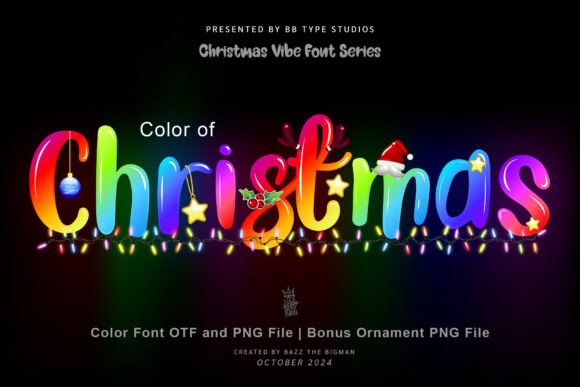
Bring Joy to Every Project with the Color of Christmas Font
There’s something magical about the first time you type “Merry Christmas” in a font that doesn’t just say the words—but *feels* like them. The Color of Christmas font does exactly that: it wraps tradition, cheer, and visual warmth into every letter. Designed for creators who want their holiday projects to resonate emotionally—not just look festive—it’s more than decorative type. It’s storytelling in glyph form.
What Makes Color of Christmas Stand Out?
Unlike standard holiday fonts that lean heavily on snowflakes or candy cane stripes, Color of Christmas balances bold personality with clean usability. Its design features hand-crafted curves, subtle ornamentation (think holly sprigs tucked into letter terminals), and joyful spacing that invites readability—even at small sizes on greeting cards or gift tags.
The font comes in two distinct versions—black and color—each serving different creative needs and technical environments. That duality is key: it means you’re not forced to choose between versatility and vibrancy. You get both—just not in the same file format.
The Black Version: Your Go-To for Cutting Machines
If you're designing for physical crafts—especially with Cricut, Silhouette Cameo, or other cutting machines—the black version of Color of Christmas is your best friend. Built as a standard OTF/TTF font, it loads seamlessly into Cricut Design Space, Sure Cuts A Lot, and similar platforms. That means you can type, weld, contour, and cut without workarounds.
- No rasterizing needed: Type your text, adjust size, and send straight to your machine.
- Fully scalable: Looks crisp whether you're cutting a 2-inch ornament tag or a 24-inch wall decal.
- Works with layers and shadows: Pair it with offset effects or layer colors manually for depth—even without native color support.
Imagine creating a set of personalized hot cocoa mugs: “Jingle All the Way” arched perfectly around the rim, cleanly cut from vinyl, then pressed onto ceramic. Or crafting a rustic wooden sign for your front door—“Home for the Holidays”—with smooth, confident cuts thanks to well-hinted outlines. That’s the reliability the black version delivers.
The Color Version: Where Typography Meets Illustration
This is where Color of Christmas truly sparkles—literally. The color version includes built-in reds, greens, golds, and snowy whites, often with subtle gradients or texture overlays that mimic foil stamping or watercolor washes. It’s not just colored letters; it’s festive *artwork* you type.
But—and this is critical—it only works in programs that support OpenType-SVG or COLR/CPAL color font technology. That includes:
- Adobe Photoshop (CC 2021+)
- Adobe Illustrator (CC 2022+)
- Silhouette Studio (Business Edition or higher)
- Inkscape (v1.1+, with SVG font support enabled)
It will not load as a color font in Cricut Design Space, Canva, Microsoft Word, or older design tools. Attempting to install the color OTF/TTF files there will display only the black outline—no holiday hues. So before downloading or purchasing, check your software version. When in doubt, refer to our Ultimate Font Guide for step-by-step compatibility checks and setup tips.
Real-World Uses That Shine
Knowing Color of Christmas is one thing. Knowing how—and when—to use it is where real value kicks in.
For Small-Business Owners & Etsy Sellers
If you sell handmade ornaments, custom wrapping paper, or seasonal apparel, this font helps your listings stand out in crowded feeds. A t-shirt mockup featuring “Believe” in full-color Color of Christmas instantly signals premium holiday energy—no extra graphics needed. Likewise, using the black version to cut iron-on designs ensures crisp, consistent results across hundreds of orders.
For Teachers & Classroom Creatives
Teachers love printable resources that feel special but don’t require hours of design time. With the black version, you can generate instant classroom banners (“Happy Holidays from Room 204!”) and cut them for bulletin boards. The color version? Perfect for digital newsletters, Google Slides holiday lessons, or printable certificates (“Santa’s Official Helper Award”).
For DIY Enthusiasts & Home Decorators
Think beyond paper and vinyl. Try the black version to cut stencils for painting wooden sleds or ceramic tree skirts. Use the color version to design social media posts announcing your cookie exchange—or to build a printable Advent calendar with each day’s activity styled in rich, joyful tones.
Smart Tips Before You Start Designing
Getting the most from Color of Christmas isn’t just about picking a version—it’s about planning ahead.
- Match font to output: Are you printing digitally? Cutting vinyl? Embroidering? Each path favors one version over the other.
- Test before scaling: While both versions scale beautifully, extremely tight kerning at tiny sizes (under 12 pt) may need manual adjustment—especially in the color version, where fine details can blur.
- Layer thoughtfully: In programs like Photoshop or Illustrator, combine the color version with subtle drop shadows or texture overlays—but avoid heavy filters that muddy the built-in hues.
- Back up your files: Because color fonts rely on specific tech, always save layered .PSD or .AI files alongside exported PNGs or PDFs for sharing or printing.
Why This Font Fits Modern Creative Workflows
Today’s creators juggle multiple tools, audiences, and outputs—all while valuing speed and consistency. Color of Christmas respects that reality. It eliminates the need to manually recolor letters or trace outlines for cutting. It reduces design time without sacrificing personality. And because it’s built with both traditional and modern font standards in mind, it bridges gaps between crafters, designers, educators, and entrepreneurs.
You’re not just installing a font—you’re adding a reliable, joyful tool to your creative kit. One that performs across devices, scales across mediums, and stays true to its spirit: warm, inclusive, and unapologetically festive.
Final Thought: Choose Intentionally, Create Confidently
There’s no “wrong” version of Color of Christmas—only the right one for your next project. If your goal is precision cutting and broad machine compatibility, go with the black version. If you’re crafting digital assets where color, texture, and instant visual impact matter most, the color version unlocks expressive potential few holiday fonts match.
Either way, you’re choosing a font designed not just to be seen—but to be felt. To make someone pause, smile, and remember why this season matters. That’s the quiet power of thoughtful typography. And that’s the enduring charm of Color of Christmas.