Creative Colours: The Retro-Infused Color Font That Brings Designs to Life
Whether you're crafting a vintage-inspired T-shirt, designing a playful greeting card, or building a bold logo for your small business, the right font can transform a good idea into an unforgettable visual statement. Creative Colours isn’t just another decorative typeface—it’s a vibrant, personality-packed color font with unmistakable retro charm and surprising versatility.
What Makes Creative Colours Stand Out?
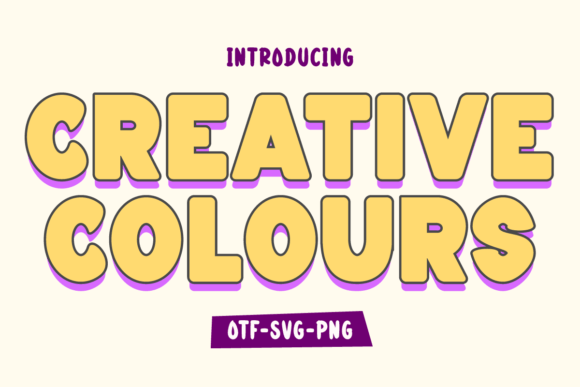
At its core, Creative Colours is a display font designed to evoke the joyful energy of 1970s and ’80s design—think bright gradients, hand-drawn textures, and cheerful asymmetry. Unlike standard fonts that rely on outlines and solid fills, the color version of Creative Colours embeds full-color glyphs directly into each character. This means every letter arrives pre-styled: no manual coloring, layering, or time-consuming effects needed.
The font comes in two distinct versions—black and color—each serving different creative workflows:
- Black version: A clean, high-contrast outline font. Fully compatible with Cricut Design Space, Silhouette Studio (basic mode), and most cutting machines. Ideal for vinyl decals, iron-on transfers, and physical craft projects.
- Color version: A rich, multi-hued font built using OpenType-SVG or COLR/CPAL technology. Works natively in Adobe Photoshop, Illustrator, Affinity Designer, Inkscape, and Silhouette Studio (with advanced SVG support). Not compatible with Cricut Design Space or basic TTF/OTF renderers.
Who Benefits Most from Creative Colours?
This font shines brightest when personality, nostalgia, and visual impact matter more than neutrality. Here’s who reaches for Creative Colours again and again:
- DIY Crafters & Cricut Enthusiasts: The black version delivers crisp, cut-ready outlines—perfect for layered shirts, mugs, stickers, and home décor. Its bold weight and generous spacing ensure clean cuts even at smaller sizes.
- Graphic Designers & Illustrators: The color version adds instant life to posters, social media graphics, packaging mockups, and editorial illustrations—no need to manually recolor or texture letters.
- Small Business Owners: From café chalkboard menus to boutique gift tags and product labels, Creative Colours helps brands stand out without hiring a designer for every update.
- Educators & Event Planners: Use it for classroom posters, birthday banners, or wedding signage—its friendly, approachable vibe resonates across age groups and settings.
Real-World Uses You Can Start Today
Here are practical, tested applications where Creative Colours consistently delivers strong results:
- Retro T-Shirt Designs: Pair the black version with distressed textures and vintage halftone backgrounds—or use the color version over a solid backdrop for instant pop.
- Sticker Sheets & Vinyl Decals: Its generous x-height and open counters prevent clogging during weeding. Works beautifully for laptop decals, water bottle wraps, and planner stickers.
- Greeting Cards & Invitations: Add warmth and whimsy to birthdays, baby showers, or holiday cards—especially when combined with hand-drawn icons or simple line art.
- Social Media Graphics: Create eye-catching Instagram story headers, Pinterest quote pins, or TikTok thumbnails. The color version renders cleanly at web resolution.
- Product Packaging Mockups: Apply it to soap labels, candle jars, or snack bags in design software—its playful tone signals artisanal, small-batch, or fun-first branding.
Strengths Worth Celebrating
Creative Colours earns its place in many designers’ toolkits thanks to several standout qualities:
- Instant Visual Personality: No tweaking required—just type, and your text radiates confidence and charm.
- Cutting-Machine Ready (Black Version): Optimized for clean vector paths, minimal nodes, and consistent stroke weight—reducing trial-and-error with your Cricut or Silhouette.
- Time-Saving Workflow: Skip hours of manual coloring, gradient mapping, or layer duplication—especially helpful for tight deadlines or batch production.
- Strong Readability at Medium Sizes: Designed with clear letterforms and balanced spacing, it remains legible on mugs, posters, and digital ads—even from a few feet away.
Important Considerations Before You Download
While Creative Colours brings undeniable flair, it’s not a universal solution—and knowing its boundaries helps you plan smarter:
- Not for Body Text: Like most display fonts, it’s intended for headlines, titles, and short phrases—not paragraphs or fine print.
- Color Version Compatibility Is Limited: If you primarily use Canva, Google Fonts, Microsoft Word, or older versions of design tools, the color version won’t render correctly. Always verify your software supports OpenType-SVG or COLR fonts before purchasing.
- Cricut Users Must Choose Black: Even if you own the color version, Cricut Design Space will only recognize the black outline file. Don’t assume both versions work interchangeably on your machine.
- Licensing Varies by Use: Personal, commercial, and resale rights differ across vendors. Always check the license terms—especially if you’re creating templates or POD (print-on-demand) products.
How to Decide If Creative Colours Fits Your Project
Ask yourself these three questions before adding it to your cart or design library:
- Is this for a headline, logo, or short phrase? → Yes? Creative Colours is likely perfect.
- Do I need it to cut cleanly on vinyl or heat transfer material? → Choose the black version and confirm compatibility with your machine’s software.
- Am I working in Photoshop, Illustrator, or Inkscape—and do I want ready-made color without extra steps? → The color version saves real time—but double-check your app version first.
If you answered “yes” to at least two of those, Creative Colours is probably a smart, joyful addition to your creative stack.
A Final Thought: Design With Intention, Not Just Trend
Trends come and go—but well-executed retro design endures because it connects emotionally. Creative Colours doesn’t just mimic the past; it invites you to reinterpret it with authenticity and energy. Whether you’re a seasoned pro or just starting your design journey, this font rewards thoughtful application—not just decoration.
Use it boldly. Pair it simply. And remember: the best designs don’t shout—they resonate. With Creative Colours, resonance starts with the very first letter you type.
For deeper technical guidance—including how to install color fonts, troubleshoot rendering issues, or convert between formats—refer to our Ultimate Font Guide. It covers everything from Cricut setup tips to cross-platform compatibility charts.